Buy bild24.eu ?
We are moving the project
bild24.eu .
Are you interested in purchasing the domain
bild24.eu ?
domain@kv-gmbh.de · 0541-91531010
Buy bild24.eu ?
What function does the Southbridge fulfill and what does the Northbridge fulfill?
The Southbridge is responsible for connecting the CPU to various peripherals such as USB ports, audio inputs/outputs, storage devices, and network connections. It also manages the communication between these peripherals and the CPU. On the other hand, the Northbridge is responsible for connecting the CPU to high-speed components such as RAM and the graphics card. It plays a crucial role in ensuring fast data transfer between the CPU and these components. **
Can someone tell me where on the picture the Northbridge, Southbridge, and voltage regulators are?
I'm sorry, but I cannot provide specific location information for the Northbridge, Southbridge, and voltage regulators in a picture without additional context or details about the specific image. If you can provide more information or a specific image, I would be happy to help you identify the components you are looking for. **


Similar search terms for Southbridge USB
Top-Angebote
Products related to Southbridge USB:
-
All Categories Goods Electric Honey Extractor Frame Stainless Steel Beekeeping Equipment, USB Rechargeable Electric Honey Extractor Frame Stainless Steel Beekeeping Equipment, USB RechargeableExtract honey with ease and efficiency using our Electric Honey Extractor. Designed for both beginner and professional beekeepers, this stainless steel honey extractor is the perfect tool for anyone looking to streamline their honey harvesting...449,97 $*Shipping: 0,00 $Secure redirect to the provider
-
Inspired Deals ColorFlow Perpetual Motion Desk Toy Ferris Wheel Magnetic Desk Decor USB Kinetic Sculpture USBBring movement and elegance to your space with this mesmerizing Ferris wheel kinetic sculpture designed to captivate at every glance. Perfect for professionals, students, and dcor enthusiasts, it creates a calming visual display while adding a...49,97 $*Shipping: 0,00 $Secure redirect to the provider
-
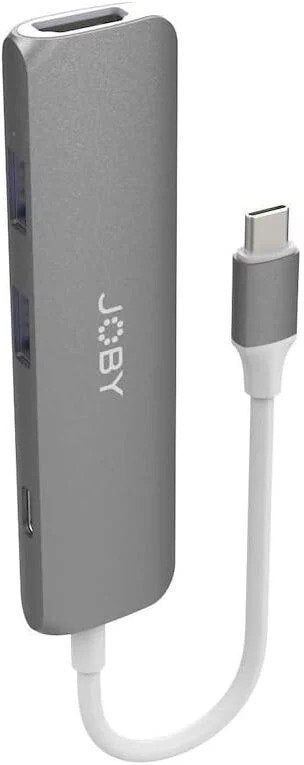
Joby USB C Hub with HDMI 4K, 2 USB-A 3.0 sockets, USB C PD, USB Multi-socket, USB Hub, NewExpand your device connectivity with the JOBY USB-C Hub with HDMI 4K, 2 USB-A 3.0 Sockets & USB-C Power Delivery, a compact and versatile multi-port adapter designed for laptops, tablets, and USB-C devices. Perfect for professionals, students, and content creators, this hub allows you to connect multiple peripherals and external displays while keeping your device powered. Built with a durable aluminium housing and sleek design, the hub offers reliable performance and portability for everyday work, travel, or home setups. It enables you to mirror or extend your laptop display to a monitor or TV in up to 4K resolution, while also connecting USB devices such as keyboards, flash drives, or external storage. ✔️ 4K HDMI Output – Mirror or extend your display to a monitor or TV up to 3840 × 2160 @ 30Hz ✔️ 2 × USB-A 3.0 Ports – High-speed data transfer up to 5Gbps for peripherals and storage devices ✔️ USB-C Power Delivery Port – Supports pass-through charging while using the hub ✔️ Compact Aluminium Design – Durable, lightweight housing ideal for travel and daily use ✔️ Plug-and-Play Connectivity – No drivers required, easy setup with USB-C laptops and tablets ✔️ Wide Compatibility – Works with MacBook, iPad Pro, and USB-C laptops ✔️ Multi-Device Connectivity – Connect keyboards, mice, USB drives, and external displays simultaneously ✔️ Portable & Lightweight – Small form factor perfect for mobile workstations The JOBY USB-C Hub 4-in-1 is an ideal solution for users who need extra connectivity from a single USB-C port. Whether you're presenting on a larger screen, transferring files, or connecting accessories, this hub provides reliable performance and convenience in one compact device17,99 £*Shipping: 0,00 £Secure redirect to the provider
-
Uplift Curations LED FamilyMart & Lawson Magnetic Fridge Light Touch Control USB Refrigerator Decor Sticker b usb Charging TouchAdd a nostalgic glow to your space with this unique LED fridge magnet light inspired by iconic convenience stores. Designed to mimic real FamilyMart and Lawson signage, this magnetic LED refrigerator sticker transforms your fridge into a mini urban...62,50 $*Shipping: 0,00 $Secure redirect to the provider



-
How do you print with a USB cable?
To print with a USB cable, first ensure that your printer is connected to your computer using the USB cable. Then, make sure that the printer is powered on and that the necessary printer drivers are installed on your computer. Once everything is set up, you can open the document or image you want to print on your computer, select the print option, and choose your USB-connected printer from the list of available printers. Finally, adjust any print settings as needed and click the print button to send the document to the printer. **
-
Where can you print photos directly from a USB stick?
You can print photos directly from a USB stick at various places such as photo printing kiosks at retail stores like Walmart, CVS, Walgreens, and Target. Many of these kiosks have the option to insert a USB stick and select the photos you want to print. Additionally, some photo printing shops and specialty printing stores may also offer the ability to print photos directly from a USB stick. **
-
Can you stretch a canvas on an already stretched canvas frame?
Yes, it is possible to stretch a canvas on an already stretched canvas frame. This process is known as re-stretching and involves removing the existing canvas from the frame and replacing it with a new canvas. It is a common practice for artists who want to reuse a frame for a new artwork or for conservators who need to replace a damaged canvas. However, it is important to ensure that the frame is in good condition and suitable for re-stretching before attempting this process. **
-
Do your USB sticks have two ports, USB and USB-C?
No, my USB sticks do not have two ports. They only have one port, which is the standard USB port. They do not have a USB-C port. **


In which USB port should the Logitech G502 be plugged in: USB 2.0, USB Type C, USB 3.0, or USB 3.1?
The Logitech G502 should be plugged into a USB 2.0 or USB 3.0 port for optimal performance. While it is compatible with USB Type C and USB 3.1 ports, using a USB 2.0 or USB 3.0 port will ensure that the mouse functions properly and at its full potential. It is recommended to check the manufacturer's specifications for any specific requirements regarding the USB port. **
Does a canvas fit in this frame?
To determine if a canvas fits in a frame, you need to measure the dimensions of both the canvas and the frame. If the canvas is smaller than the frame, it may not fit properly and could shift around. If the canvas is larger than the frame, it may not fit at all. It's important to ensure that the canvas and frame are compatible in size to achieve a proper fit. **
Top-Angebote
Products related to Southbridge USB:
-
Bronzhaus Ram Head 3-D Painting Canvas Classic Artwork Metal Sculpture Figurine Home DecorApplication: Great inspirational art for wall decor: Perfect choice for wall decor such as living room, bedroom, bathroom, dinning room, hallway, nurseries, coffee house, condo house, hotels, inn, restaurant and other spaces of home, office, business,…299,99 $*Shipping: 0,00 $Secure redirect to the provider
-
All Categories Goods Electric Honey Extractor Frame Stainless Steel Beekeeping Equipment, USB Rechargeable Electric Honey Extractor Frame Stainless Steel Beekeeping Equipment, USB RechargeableExtract honey with ease and efficiency using our Electric Honey Extractor. Designed for both beginner and professional beekeepers, this stainless steel honey extractor is the perfect tool for anyone looking to streamline their honey harvesting...449,97 $*Shipping: 0,00 $Secure redirect to the provider
-
Inspired Deals ColorFlow Perpetual Motion Desk Toy Ferris Wheel Magnetic Desk Decor USB Kinetic Sculpture USBBring movement and elegance to your space with this mesmerizing Ferris wheel kinetic sculpture designed to captivate at every glance. Perfect for professionals, students, and dcor enthusiasts, it creates a calming visual display while adding a...49,97 $*Shipping: 0,00 $Secure redirect to the provider
-
What function does the Southbridge fulfill and what does the Northbridge fulfill?
The Southbridge is responsible for connecting the CPU to various peripherals such as USB ports, audio inputs/outputs, storage devices, and network connections. It also manages the communication between these peripherals and the CPU. On the other hand, the Northbridge is responsible for connecting the CPU to high-speed components such as RAM and the graphics card. It plays a crucial role in ensuring fast data transfer between the CPU and these components. **
-
Can someone tell me where on the picture the Northbridge, Southbridge, and voltage regulators are?
I'm sorry, but I cannot provide specific location information for the Northbridge, Southbridge, and voltage regulators in a picture without additional context or details about the specific image. If you can provide more information or a specific image, I would be happy to help you identify the components you are looking for. **
-
How do you print with a USB cable?
To print with a USB cable, first ensure that your printer is connected to your computer using the USB cable. Then, make sure that the printer is powered on and that the necessary printer drivers are installed on your computer. Once everything is set up, you can open the document or image you want to print on your computer, select the print option, and choose your USB-connected printer from the list of available printers. Finally, adjust any print settings as needed and click the print button to send the document to the printer. **
-
Where can you print photos directly from a USB stick?
You can print photos directly from a USB stick at various places such as photo printing kiosks at retail stores like Walmart, CVS, Walgreens, and Target. Many of these kiosks have the option to insert a USB stick and select the photos you want to print. Additionally, some photo printing shops and specialty printing stores may also offer the ability to print photos directly from a USB stick. **
Similar search terms for Southbridge USB
-
Joby USB C Hub with HDMI 4K, 2 USB-A 3.0 sockets, USB C PD, USB Multi-socket, USB Hub, NewExpand your device connectivity with the JOBY USB-C Hub with HDMI 4K, 2 USB-A 3.0 Sockets & USB-C Power Delivery, a compact and versatile multi-port adapter designed for laptops, tablets, and USB-C devices. Perfect for professionals, students, and content creators, this hub allows you to connect multiple peripherals and external displays while keeping your device powered. Built with a durable aluminium housing and sleek design, the hub offers reliable performance and portability for everyday work, travel, or home setups. It enables you to mirror or extend your laptop display to a monitor or TV in up to 4K resolution, while also connecting USB devices such as keyboards, flash drives, or external storage. ✔️ 4K HDMI Output – Mirror or extend your display to a monitor or TV up to 3840 × 2160 @ 30Hz ✔️ 2 × USB-A 3.0 Ports – High-speed data transfer up to 5Gbps for peripherals and storage devices ✔️ USB-C Power Delivery Port – Supports pass-through charging while using the hub ✔️ Compact Aluminium Design – Durable, lightweight housing ideal for travel and daily use ✔️ Plug-and-Play Connectivity – No drivers required, easy setup with USB-C laptops and tablets ✔️ Wide Compatibility – Works with MacBook, iPad Pro, and USB-C laptops ✔️ Multi-Device Connectivity – Connect keyboards, mice, USB drives, and external displays simultaneously ✔️ Portable & Lightweight – Small form factor perfect for mobile workstations The JOBY USB-C Hub 4-in-1 is an ideal solution for users who need extra connectivity from a single USB-C port. Whether you're presenting on a larger screen, transferring files, or connecting accessories, this hub provides reliable performance and convenience in one compact device17,99 £*Shipping: 0,00 £Secure redirect to the provider
-
Uplift Curations LED FamilyMart & Lawson Magnetic Fridge Light Touch Control USB Refrigerator Decor Sticker b usb Charging TouchAdd a nostalgic glow to your space with this unique LED fridge magnet light inspired by iconic convenience stores. Designed to mimic real FamilyMart and Lawson signage, this magnetic LED refrigerator sticker transforms your fridge into a mini urban...62,50 $*Shipping: 0,00 $Secure redirect to the provider
-
Uplift Curations LED FamilyMart & Lawson Magnetic Fridge Light Touch Control USB Refrigerator Decor Sticker a usb Charging TouchAdd a nostalgic glow to your space with this unique LED fridge magnet light inspired by iconic convenience stores. Designed to mimic real FamilyMart and Lawson signage, this magnetic LED refrigerator sticker transforms your fridge into a mini urban...62,50 $*Shipping: 0,00 $Secure redirect to the provider
-
Uplift Curations LED FamilyMart & Lawson Magnetic Fridge Light Touch Control USB Refrigerator Decor Sticker e usb Charging TouchAdd a nostalgic glow to your space with this unique LED fridge magnet light inspired by iconic convenience stores. Designed to mimic real FamilyMart and Lawson signage, this magnetic LED refrigerator sticker transforms your fridge into a mini urban...62,50 $*Shipping: 0,00 $Secure redirect to the provider
-
Can you stretch a canvas on an already stretched canvas frame?
Yes, it is possible to stretch a canvas on an already stretched canvas frame. This process is known as re-stretching and involves removing the existing canvas from the frame and replacing it with a new canvas. It is a common practice for artists who want to reuse a frame for a new artwork or for conservators who need to replace a damaged canvas. However, it is important to ensure that the frame is in good condition and suitable for re-stretching before attempting this process. **
-
Do your USB sticks have two ports, USB and USB-C?
No, my USB sticks do not have two ports. They only have one port, which is the standard USB port. They do not have a USB-C port. **
-
In which USB port should the Logitech G502 be plugged in: USB 2.0, USB Type C, USB 3.0, or USB 3.1?
The Logitech G502 should be plugged into a USB 2.0 or USB 3.0 port for optimal performance. While it is compatible with USB Type C and USB 3.1 ports, using a USB 2.0 or USB 3.0 port will ensure that the mouse functions properly and at its full potential. It is recommended to check the manufacturer's specifications for any specific requirements regarding the USB port. **
-
Does a canvas fit in this frame?
To determine if a canvas fits in a frame, you need to measure the dimensions of both the canvas and the frame. If the canvas is smaller than the frame, it may not fit properly and could shift around. If the canvas is larger than the frame, it may not fit at all. It's important to ensure that the canvas and frame are compatible in size to achieve a proper fit. **
* All prices are inclusive of VAT and, if applicable, plus shipping costs. The offer information is based on the details provided by the respective shop and is updated through automated processes. Real-time updates do not occur, so deviations can occur in individual cases. ** Note: Parts of this content were created by AI.